MovieBox APK Download Free Android [Latest Version] 2026
MovieBox Apk offers the latest MovieBox APK version for Android, PC, iOS and TV. Check features, compatibility, updates and download details.
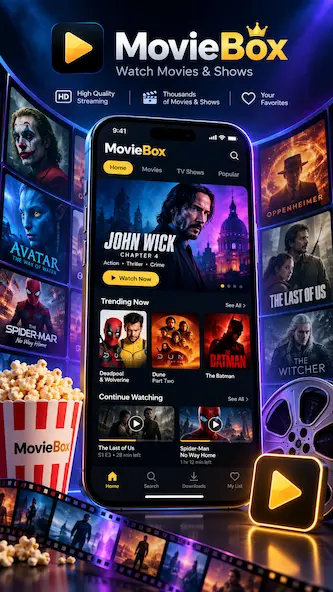
MovieBox is an entertainment app that provides a simple way to browse movies, TV shows, and other supported video content in one place. It includes a clean interface, search tools, subtitle options, playback controls, and support for different devices. Users can check the latest Android release, PC setup, TV compatibility, and older versions before installing it.
The latest build is designed to provide smoother performance on supported Android devices. Updates may include interface improvements, better compatibility, faster navigation, and improved playback options. For the installation file and setup instructions, visit the MovieBox APK Download page.
What is MovieBox?
MovieBox is a media application created for users who want an easy interface for browsing and watching supported video content. It organizes titles into categories and includes search tools that make it easier to find movies and shows.
The app can be used on Android phones and tablets, while some users also access it on PCs, Android TV devices, or other compatible platforms. Features can vary depending on the version and device being used.
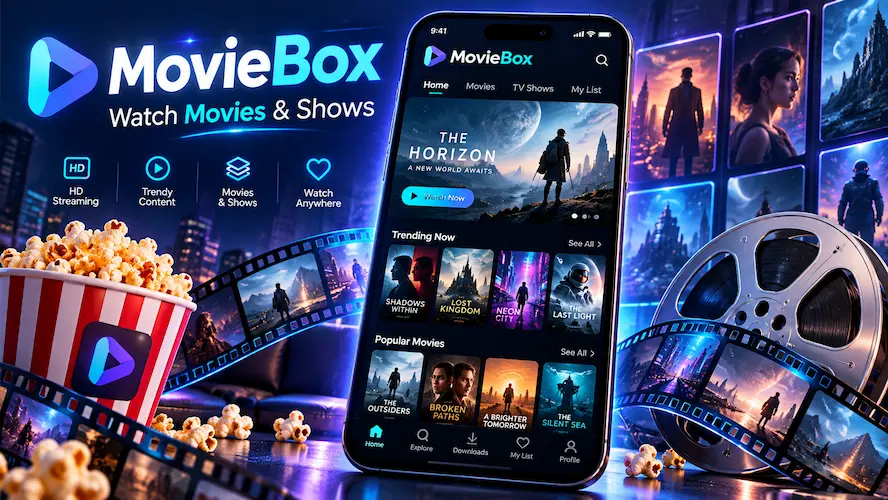
What is MovieBox APK?
The APK is the Android installation package used to install the application manually on compatible devices. This file format is commonly used when an app is installed outside an official marketplace.
Users looking for the newest Android package can check the Download page for installation details.
What is MovieBox Pro?
MovieBox Pro is a name commonly used for certain app variants that may include a different package build or additional features. Since features can vary between releases, users should check the version details before installing any file.
MovieBox App Information
| App Details | Information |
|---|---|
| App Name | MovieBox |
| File Type | APK |
| Category | Entertainment |
| Platform | Android and compatible devices |
| Version | Latest available version |
| Update | 2026 |
| Installation | Manual APK installation |
| Supported Devices | Android, tablets, PC, TV and selected other devices |
App details may change with new releases, so it is useful to check the latest version information before downloading.
MovieBox Latest Version 2026
The latest MovieBox version is designed to work better with newer devices and recent Android releases. Updates may include bug fixes, navigation changes, playback improvements, compatibility updates, and small interface refinements.
Using a recent build can also reduce problems caused by outdated files. However, users with older phones may prefer an earlier release if the newest version does not perform well on their device.
What’s New in the Latest Version?
Changes depend on the specific release. Updates may focus on smoother navigation, better device compatibility, improved playback stability, faster search performance, and small interface changes.
Users should check the actual changelog before installing because not every release includes major new features.
MovieBox Update
Updating the app normally involves downloading a newer APK and installing it over the existing version when supported. Before updating, check the current version number and device requirements.
Users who want to compare earlier builds can visit the MovieBox Old Version page.
Key Features of MovieBox App
The app includes a range of features designed to keep navigation simple while giving users more control over browsing and playback.
Large Content Library
Available movies and TV content are organized into categories, making it easier to find different genres and titles without going through complicated menus.
Smart Search and Filters
Search tools help users find titles more quickly. Depending on the version, filters may sort content by genre, release date, popularity, or other available options.
Streaming Quality Options
Some releases may provide different video quality options. Actual playback quality can depend on the source, device capability, internet speed, and installed version.
Offline Viewing
Where supported, selected content may be saved for later viewing. This can be useful when internet access is limited.
Built-in Video Player
A built-in player can provide basic playback controls such as play, pause, seek, subtitle options, and video quality settings.
Subtitle Support
Subtitle support may be available for different titles. Language options can vary depending on the content source.
Multilingual Support
Some releases include support for multiple languages in the interface, subtitles, or available audio tracks.
Watch History
Watch history can help users return to previously opened content without searching for the same title again.
Watchlist
A watchlist feature allows users to save movies or shows they want to watch later.
Simple User Interface
The interface is usually designed around straightforward menus, content sections, and search features. This makes the app easier to use for users who prefer a clean layout.
Dark Mode
Some versions may include a darker interface that can be more comfortable to use at night or in low-light environments.
Chromecast and Screen Casting
On supported devices, casting or screen-mirroring options may allow content to be displayed on a larger screen.
How Does MovieBox Work?
The app follows a simple browsing process. Users can open it, search for a movie or show, select a title, and choose an available playback option.
Depending on the installed version, users may also be able to change video quality, enable subtitles, add titles to a watchlist, or save supported content for offline use. Available options can vary by device and release.
What Can You Watch on MovieBox?
The platform is mainly used for browsing different types of entertainment content. Its available library can change over time depending on the version and connected content sources.
Movies
Users can browse different movie categories and search for titles by name.
TV Shows and Series
The app may also include television shows and series organized by category or release information.
Latest Releases
Newer releases may appear in dedicated sections when available.
Popular and Trending Content
Some versions may highlight content based on popularity or current user interest.
Different Genres
Common categories can include action, comedy, drama, thriller, romance, animation, and other genres.
MovieBox APK Download
Users searching for the latest Android installation file can use the dedicated MovieBox APK Download page.
That page can include the latest version details, requirements, installation instructions, and other download-related information without making the homepage overly repetitive.
MovieBox System Requirements
System requirements can differ between releases, but users should generally check Android version, free storage, available memory, and device compatibility before installing the app.
Android Requirements
Android phones and tablets need enough free storage and a compatible Android version to install the APK correctly.
PC Requirements
PC users generally require a compatible Android emulator if there is no native Windows application available. You can read the setup information on PC page.
TV Requirements
Android TV devices may support APK installation when the device allows third-party apps.
iOS Requirements
iPhone and iPad support depends on whether a compatible iOS version of the app is actually available. Users should avoid unverified installation methods.
MovieBox for Android
MovieBox is commonly used on Android phones because APK files are designed for the Android platform. Users should always check the file version and Android requirements before starting installation.
More detailed Android information can be placed on the MovieBox for Android page.
MovieBox APK for Android
The Android package can be installed manually on compatible phones and tablets. In some cases, installation permission must be enabled for the browser or file manager used to open the APK.
MovieBox for Tablet
Android tablets can usually follow the same installation process as Android phones, provided the device meets the app requirements.
How to Install MovieBox APK on Android
The basic installation process is simple.
Download the APK
Download the latest compatible APK file from the relevant download page.
Allow Installation Permission
Android may ask permission to install apps from the browser or file manager being used.
Install the App
Open the APK file and follow the installation prompt.
Open MovieBox
After installation is complete, open the app and check whether it runs correctly on your device.
For complete instructions, use the Download page.
MovieBox for PC
The app can also be used on a computer when a compatible setup method is available. In many cases, Android applications are run through an emulator on Windows.
The complete setup process is explained on the MovieBox for PC page.
MovieBox on Windows 10 and 11
Windows users can install a compatible Android emulator, load the APK file, and run the application inside the emulator environment.
MovieBox on Laptop
The same method normally applies to laptops running a supported version of Windows.
MovieBox for iOS
Availability on iPhone and iPad differs from Android because iOS devices cannot install APK files directly. Users should check whether a genuine compatible iOS version or supported installation method is available.
More information is available on the MovieBox for iOS page.
MovieBox for iPhone
iPhone users should only use installation methods that are compatible with their iOS version.
MovieBox for iPad
The same compatibility rule applies to iPad users.
MovieBox Android TV and Smart TV
The app may work on Android TV devices when manual APK installation is supported. Compatibility depends on the television operating system and installed version. Pasted text
For complete setup instructions, visit the MovieBox Android TV page.
Android TV
Android TV users can install a compatible APK if the device allows installation from external sources.
Smart TV
Support depends on the operating system used by the television. Not every Smart TV supports Android APK files.
Fire TV and Firestick
Some Fire TV devices can run Android-based applications, but compatibility may vary depending on the app version and device software.
Chromecast and Screen Mirroring
Users with supported hardware may also use casting or screen mirroring instead of installing the app directly on a television.
MovieBox Device Compatibility
| Device | General Compatibility | Method |
|---|---|---|
| Android Phone | Supported when compatible | APK |
| Android Tablet | Supported when compatible | APK |
| Windows PC | Possible | Android emulator |
| Laptop | Possible | Android emulator |
| Android TV | Device dependent | APK |
| Firestick | Device dependent | Compatible Android method |
| iPhone / iPad | Version dependent | iOS-compatible method |
Compatibility can change between releases, so users should check the requirements before installing.
MovieBox Old Version
Some users prefer an older release when the newest build does not perform well on their device. Earlier versions may also have lower system requirements or a more familiar interface.
However, older builds may not include recent bug fixes, compatibility improvements, or interface changes.
You can compare earlier releases on the MovieBox Old Version page.
Why Some Users Prefer Older Versions
Older builds can sometimes work better on low-end or older Android devices. They may also use fewer resources depending on the release.
Latest Version vs Old Version
| Feature | Latest Version | Old Version |
|---|---|---|
| Updates | More recent | Older build |
| Compatibility | Better for newer devices | May suit older devices |
| Features | Current features | Previous feature set |
| Bug Fixes | More recent fixes | Earlier fixes |
| Interface | Current design | Older design |
MovieBox APK vs MovieBox App
The term MovieBox App refers to the application itself, while MovieBox APK refers specifically to the Android installation file.
They are closely related, but they do not mean exactly the same thing. The APK is simply the package used to install the application on Android devices. Pasted text
MovieBox vs MovieBox Pro
MovieBox and MovieBox Pro may refer to different builds or variants depending on the source. Instead of assuming every “Pro” version includes the same features, users should compare the version number, supported devices, package details, and update information.
Safety, Permissions and Privacy Considerations
Users should always review the source of an APK before installing it. Third-party Android files can request permissions that may not be necessary for the app to work.
Check the APK Source
Avoid downloading files from unknown or suspicious websites.
Review App Permissions
Check which permissions the app requests during installation or first launch.
Keep the App Updated
Newer versions may include bug fixes and compatibility changes.
Avoid Unknown Modified Files
Modified APK files from untrusted sources can carry additional risks. Users should verify files before installing them.
Common MovieBox Problems and Basic Fixes
Like other Android applications, users may sometimes experience installation, playback, or compatibility problems.
App Not Installing
Check available storage, Android compatibility, installation permissions, and whether an older conflicting version is already installed.
App Not Opening
Restart the device, clear temporary app data, and check whether the installed version supports your Android release.
Video Not Playing
Playback issues may be related to the source, internet connection, app version, or device compatibility.
Buffering or Slow Playback
Try switching network connection, lowering available quality settings, or restarting the app.
Download Not Working
Check storage space, permissions, and network stability.
Subtitles Not Showing
Subtitle availability can vary between titles and content sources.
App Crashing
Updating the app or clearing its cache may help in some cases.
Pros and Cons of MovieBox
Pros
- Simple and easy-to-use interface
- Supports Android phones and tablets
- Search and filter options make content easier to find
- Subtitle support is available for supported titles
- Offline viewing may be available in compatible versions
- Built-in video player provides basic playback controls
- Watchlist and watch history can improve usability
- Some versions support casting or screen mirroring
- Latest versions may include compatibility and performance improvements
- Can be used on different device types with compatible setup methods
Cons
- Features can differ between versions
- APK installation requires manual setup on Android
- Not every Smart TV or device supports APK files
- iPhone and iPad cannot install Android APK files directly
- Streaming performance can depend on internet speed and content source
- Older versions may miss recent fixes and compatibility updates
- Some installation methods may require additional steps
- Subtitle and playback options may vary between titles
How to Update MovieBox
Before updating, check which version is currently installed on your device. Then compare it with the latest available release.
Download the newer compatible APK and install it over the existing version if the app supports direct updates. Users should keep important app data in mind before replacing an older installation.
The latest download information is available on the Download page.
Frequently Asked Questions
Final Words
MovieBox provides a simple interface for users who want to browse movies, shows, and other supported media content on different devices. The latest version may offer better compatibility, updated navigation, and newer app improvements, while older releases can still be useful for certain devices.
For installation files and version details, use the Download page. Device-specific information can also be found on the dedicated Android, PC, iOS, TV, and old-version pages.
For additional Android security guidance, users can review Google Play Protect recommendations before installing apps from outside the Play Store.